Client management for independent trainers
Personal trainer client management software
Manage your coaching roster from the first invitation to the next plan review. Keep each client connected to their assigned workouts, training history and conversation.
No card required. Invite your first client when your workspace is ready.
What you can do with CoachBrag
Connected relationships
Keep the invited client account and assigned plan tied to the correct trainer workspace.
Useful client context
Review activity, plan details, workout history and messages before following up.
Predictable capacity
Plan around the client limits defined by the Starter, Pro and Elite plans.
From a client invitation to an active coaching relationship
Invite the client to your workspace, then assign a plan once they are connected. Before a check-in, open that client’s plan, recent workout history and conversation so you can follow up with the right context.
- Check available client slots before sending invitations; pending invitations count toward capacity.
- Confirm the client has joined your workspace before assigning their plan.
- Review the client’s current plan and recent activity before opening the conversation.
- Update the assigned plan when your review and the client’s feedback support a change.
Give the client a clear view of their own training
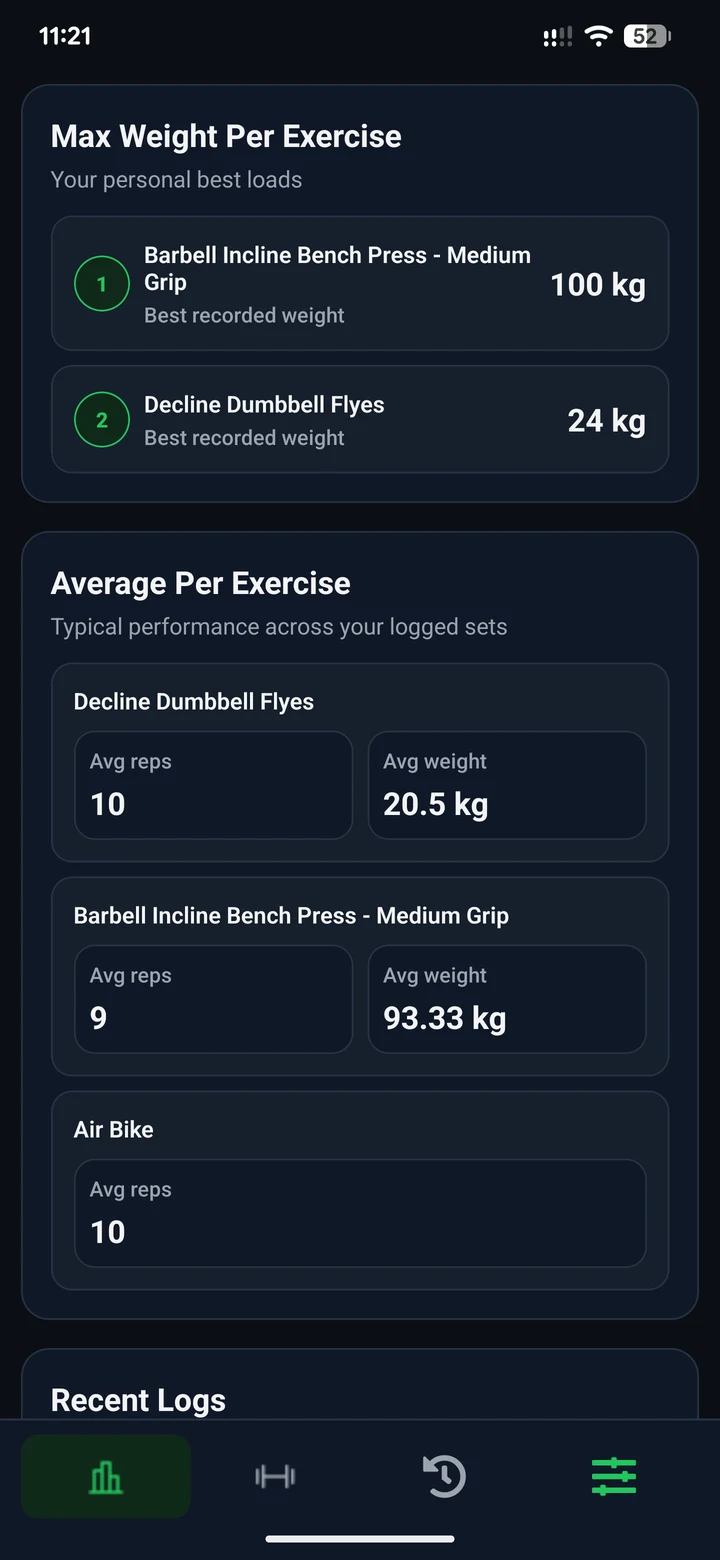
The client can review their own recorded exercise performance in CoachBrag. The example below shows best recorded loads and average values from logged sets. Use those numbers alongside session history and the client’s feedback; a personal best alone does not explain how the whole programme is going.
Keep each coaching relationship organised
Use CoachBrag to connect invited clients, assigned plans, completed workout history and trainer-client messages in one workspace, so the whole coaching relationship stays visible.
Review the context behind each client
Open the context for an active client, including the assigned plan, completed sessions, exercise history and trainer-client messages, without reconstructing the relationship from separate tools.
See which clients may need attention
The dashboard’s “Needs attention” list shows clients with an active plan and no completed workout in the last 7 days. Read the displayed reason and review the client’s workout history before following up; the signal identifies missing recent activity, not why it happened.
Separate client management from workout tracking
Client management connects the person, their assigned plan and your conversation. Workout tracking records the exercises and sets they completed. CoachBrag connects both, so you can open the training record when a client question needs more detail.
See completed workouts and set-level trackingKeep roster capacity predictable
Starter up to 3 clients, Pro up to 15 clients, Elite up to 50 clients. Pending invitations count toward capacity so the remaining number of available client slots stays predictable.
A practical coaching workflow
01
Send an invitation
Invite the client from the trainer workspace.
02
Connect the client
The client joins the correct coaching relationship through that invitation.
03
Assign a workout plan
Give the connected client a structured plan to follow and complete.
04
Review workouts and messages
Use completed activity and conversation context to guide your next check-in.
Who this client management software is for
For trainers who manage ongoing coaching relationships, not just a list of contact details.
- Personal trainers managing several active clients
- Online coaches reviewing work between check-ins
- Hybrid trainers combining in-person and remote coaching
- Trainers replacing separate spreadsheets, messages and PDFs
Frequently asked questions
What does personal trainer client management software do?
It keeps the client relationship organised around invitations, assigned plans, training context and communication. In CoachBrag, clients join by invitation and trainers can review their plan and workout history before continuing the conversation.
How do clients join CoachBrag?
Clients normally join through an invitation from their trainer, which connects the account to the correct coaching relationship.
Can I see which clients need attention?
The trainer dashboard lists clients with an active plan and no completed workout in the last 7 days, and displays “No completed workout in the last 7 days.” Review the client’s history before following up; this signal does not explain why activity stopped.
Do pending invitations count toward the client limit?
Yes. Pending invitations occupy client capacity so the remaining number of available slots stays predictable.
Can trainers and clients message inside CoachBrag?
CoachBrag supports trainer-client conversations inside the same coaching workspace as plans and workout history.
Organize your coaching clients
Start with one 14-day free trial through CoachBrag.
Related guides
How to Manage Multiple Personal Training Clients: A Weekly WorkflowA practical weekly workflow for personal trainers who need to review client activity, prioritize next steps and keep communication from taking over the day.Personal Trainer Consultation Script: A 15-Minute Guide to Finding the Right FitA practical pre-sale consultation script for personal trainers, with questions, a 15-minute structure and respectful follow-up guidance.Weekly Personal Training Client Check-In Template: Questions Every Trainer Should AskA practical weekly check-in template for personal trainers, with short and full versions plus guidance on turning client answers into useful coaching decisions.Personal Training Client Onboarding Checklist: What to Collect Before the First WorkoutA practical onboarding workflow for personal trainers covering intake, health screening, goals, scheduling, expectations, communication and the handoff into the first training plan.How to Coach Personal Training Clients Online: A Practical WorkflowA practical online coaching workflow for personal trainers: assess the client, build the plan, collect useful workout data, review progress and communicate with context.
Professional coaching software for personal trainers.
HomePricingBlogTraining plan softwarePersonal trainer client trackerClient workout trackingSupportPrivacyTermsRefund policyAccount deletion
Google Play
© 2026 CoachBrag. All rights reserved.