Completed sessions and progress history
Personal training session tracking software for trainers
See what clients completed, which sets they logged and the training context available before your next coaching decision.
No card required. Starter-level access for up to 3 clients.
What you can do with CoachBrag
Completed-session history
Keep each completed workout connected to the assigned client and plan.
Supported exercise metrics
Review logged fields such as reps, weight, duration and distance where configured.
Context for follow-up
Open recent activity before you message a client or adjust their plan.
See what a completed session actually contains
A session count is only the starting point. Open the workout history to distinguish completed and partially completed sessions, then review logged sets and training volume. The client view below shows how those records stay connected to a named workout.
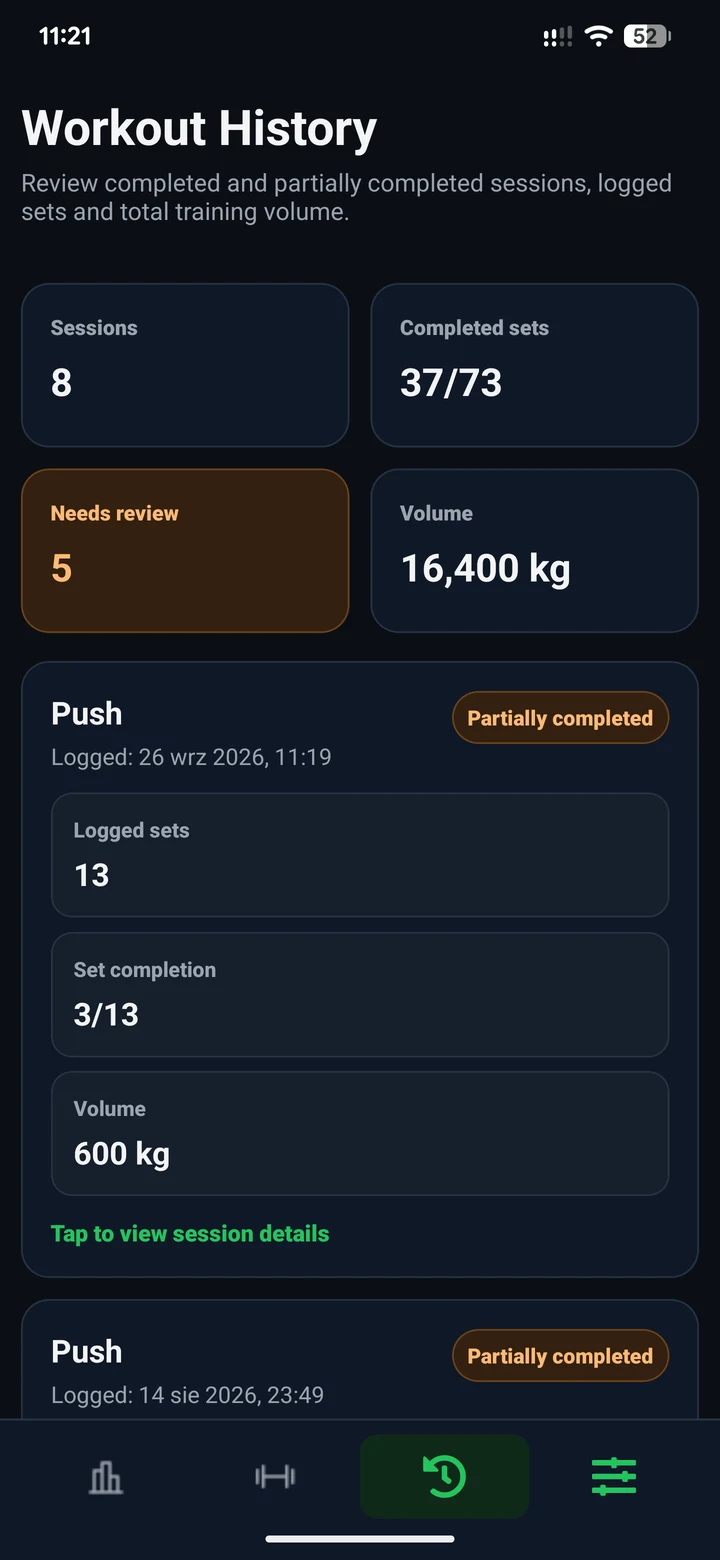
Track completed workouts and training history
A client opens their assigned plan, follows a workout and logs completed sets and reps against that plan, creating workout history the trainer can review.
Review logged sets and completion status
Compare the assigned set targets with the reps the client recorded, then open the completed session for details. Use that context to follow up in the existing client conversation; CoachBrag records performance, while you decide what to change.
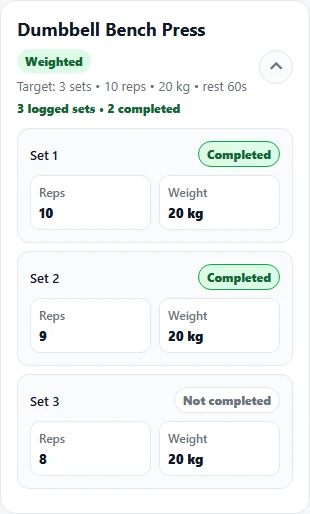
Review useful training metrics
Depending on the exercise configuration, history can include reps, weight, duration, distance and total volume where the logged exercise data supports that metric. Not every exercise requires every measurement.
Use exercise history to prepare follow-up
For example, a plan calls for three sets of eight repetitions. The client logs eight, eight and six at the same weight. Review earlier sessions and ask what happened on the final set before deciding whether to repeat or change the prescription. The log provides context; the coaching decision stays with you.
Build and adjust the next client workout planKeep workout history connected to communication
After reviewing recent sessions, open the client conversation to ask about a missed exercise or discuss the next workout. Plans, history and trainer-client messages are available in the same workspace.
Keep clients, plans and coaching conversations organizedA practical coaching workflow
01
Client opens the assigned plan
The client starts from the workout plan assigned by their trainer.
02
Client completes and logs the workout
The client records completed sets and the fields supported by the exercise.
03
CoachBrag stores the completed session
The session becomes part of the client’s connected workout history.
04
Trainer reviews history and follows up
Review recent activity, then continue the coaching conversation in the workspace.
Who benefits from client workout tracking
Clear workout history is useful for coaches who need evidence of completed training between appointments and check-ins.
- Online personal trainers
- Hybrid coaches
- Trainers reviewing sessions between appointments
- Trainers who need clearer evidence than screenshots and memory
Frequently asked questions
Is workout tracking the same as booking personal training sessions?
These are different tasks. This page covers recording completed training: exercises, sets and workout history. Appointment booking, attendance billing and prepaid session balances are separate needs; the workout history shown here is not a booking calendar or payment ledger.
What does client workout tracking show?
CoachBrag can show completed sessions, logged sets, completion status and supported training metrics connected to the assigned workout plan.
Can a trainer review workout history for one client?
Yes. CoachBrag provides trainer views for global client workout history and individual client history.
Does CoachBrag track training volume?
CoachBrag can calculate and display training volume when the logged exercise data supports that metric.
Can clients log reps, weight, duration or distance?
Clients can log the fields supported by the selected exercise and workout configuration. Not every exercise requires every measurement.
Can workout history be reviewed before messaging the client?
Yes. Trainers can review recent workout history and then continue the coaching conversation inside CoachBrag.
Track your clients’ completed training
Start with one 14-day free trial through CoachBrag.
Related guides
How to Track Client Workout Adherence as a Personal TrainerA practical, manual method for reviewing planned versus completed client workouts, understanding what a percentage can and cannot show, and choosing a useful next coaching step.Personal Trainer Client Workout Log Template: Excel Sheet and ExampleDownload a real workout-log workbook for personal trainers, with a blank set-by-set sheet, instructions and a fictional worked example.How to Track Personal Training Client Progress Over TimeA practical system for personal trainers to track client progress across weeks and months using workout performance, consistency, reassessments and coaching context.How to Track Personal Training Sessions Without SpreadsheetsA practical guide to tracking completed workouts, useful exercise metrics and training history without turning client coaching into spreadsheet administration.
Professional coaching software for personal trainers.
HomePricingBlogTraining plan softwarePersonal trainer client trackerClient workout trackingSupportPrivacyTermsRefund policyAccount deletion
Google Play
© 2026 CoachBrag. All rights reserved.